
Dimensioners that measure anything from parcels to pallets
vMeasure Dimensioner

How Pallet Measurement Software Moves Dimension Data into Warehouse Systems

A pallet is scanned at the dock in under two seconds. The dimensions are captured. But what happens to that data next decides whether your warehouse systems use it or leave it behind.
Without a software layer, dimension data stays at the point of capture. It remains isolated from the WMS, disconnected from storage decisions, and unavailable to the systems that need it. Warehouse operators end up re-entering numbers manually, storage locations get assigned based on estimates, and the accuracy gained at the dimensioner is lost before it reaches the workflow that depends on it.
Pallet measurement software closes that gap by turning raw captured data into a structured record that moves into warehouse systems and supports immediate storage decisions.

What is pallet measurement software?

Pallet measurement software is the software layer that sits between a pallet dimensioner and the warehouse systems that use measurement data. The pallet dimensioner captures the physical measurement. The software manages what happens after capture, including record storage, ID linkage, and data movement into connected warehouse systems. It does not replace the WMS or ERP. It feeds them the structured pallet data they need to act.

How does pallet measurement software turn captured data into usable warehouse records?

A dimensioning data capture system captures the physical and reference data needed to identify the pallet and build a record that warehouse systems can read.
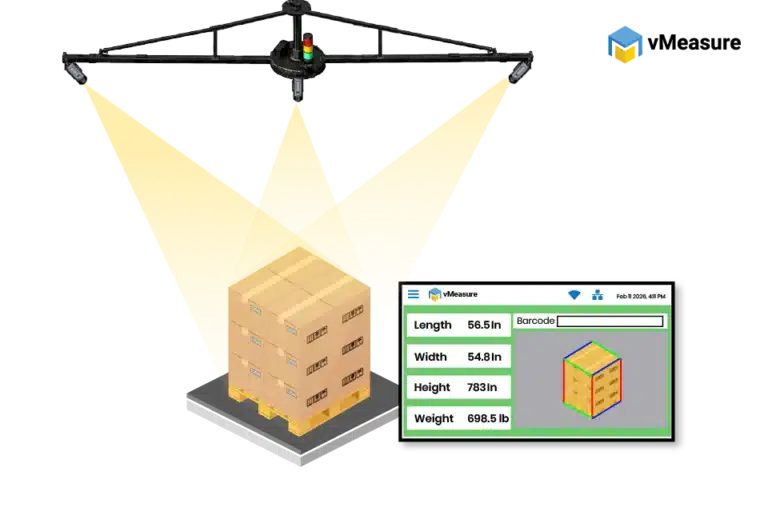
vMeasure Pallet dimensioner
Data field Why it matters in warehouse systems
Pallet ID
Connects the measurement to the physical pallet
Shipment ID or receiving reference
Links the record to an inbound or internal warehouse transaction
Length, width, and height
Supports rack fit and storage decisions
Weight
Supports location capacity rules
Cube or volume
Supports storage slot allocation
Barcode or scan reference
Connects the record to WMS lookup
Timestamp
Shows when the measurement was captured
Image proof
Keeps the visual reference attached to the same record
Together, these fields give the pallet measurement software enough context to identify the pallet, connect the scan to the right reference, and prepare the record for the next system step.

Why do pallet dimensions need to be linked to a pallet ID?

Once the pallet is measured, pallet measurement software links that captured data to the right pallet ID, shipment ID, receiving reference, or barcode. That reference tells the WMS or ERP which pallet record the measurement belongs to.
If the link is missing, the measurement still reaches the warehouse system. It just does not land against the right inbound receipt, putaway task, or storage location.
vMeasure pallet measurement software keeps the measurement data, ID, timestamp, and image proof in the same record so warehouse systems are not relying on separate manual entries or files to reconstruct what was scanned.
Warehouse systems then use that record to assign directed putaway, allocate storage slots, and update warehouse records without entering the same dimension data again.
Still moving pallet measurement records by hand?
See how vMeasure keeps captured dimensions linked to the right pallet ID before the data moves into your warehouse systems.

How does pallet measurement data move into warehouse systems?

Once pallet measurement software creates the structured record, the data is ready to move into WMS, ERP, cloud software, or another connected warehouse softwares.

This matters because manual entry breaks the connection between the measurement and the system record. Pallet measurement software keeps the captured record ready for transfer, so the data does not stay stuck at the scan point.

How are REST API, Webhook, CSV export, and cloud records used?

The transfer method depends on how the warehouse system is set up. A warehouse with direct integration sends the pallet record into its connected software. Another warehouse first reviews the record in a dashboard, then exports the data for upload.
Method How it is used
REST API
Moves pallet records from pallet measurement software into warehouse software
Webhook
Sends an update when a scan record is completed
CSV export
Gives warehouse users a structured file for upload, review, or batch movement
Cloud records
Keeps measurement records available beyond the scan station
Dashboard access
Gives users a place to search, check, and manage captured records
For real-time measurement transfer, the process is usually handled in two ways:
  • REST API: The dimensioning software sends the completed pallet record to the endpoint configured in the warehouse software. This gives warehouses live measurement transfer without heavy technical setup.
  • Webhook: The scan event triggers the transfer, and the measurement data is pushed to the specified URL. This moves the pallet record after capture instead of waiting for manual export or re-entry.
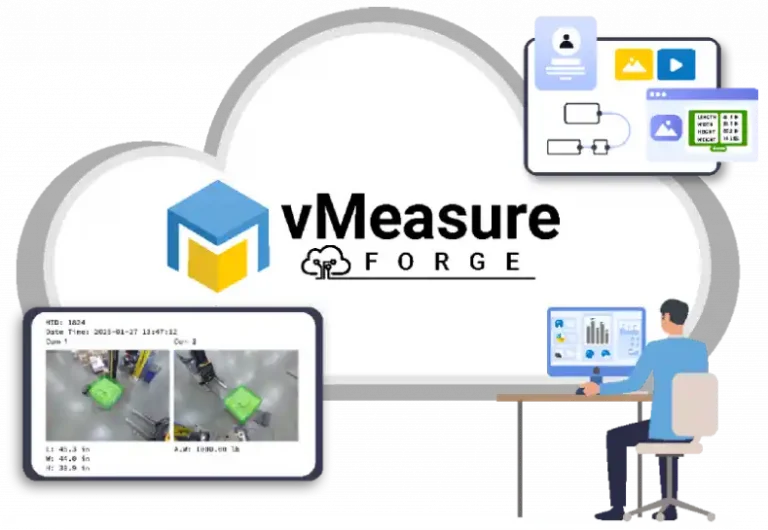
For cloud records, the measurement data and images are pushed from the dimensioning system into the cloud-based software layer after the scan. The record stays available for later access, dashboard review, and download instead of remaining only at the measurement station.
Warehouse users use cloud records to:
  • Review pallet measurement records after capture
  • Filter reports by time, site, device, or workflow
  • Download measurement data when needed
  • Download annotated images for record review
  • Keep scan records available before they move into WMS, ERP, or another warehouse system
vMeasure Forge is a cloud-based software layer that stores captured pallet records, provides dashboard access, and moves data into WMS, ERP, or connected warehouse software through no-code REST API integration, and Webhook. Each measured pallet record stays connected with its dimensions, ID reference, timestamp, and image proof after capture.
A cloud connected dimensioning solution keeps the record in a central software layer, not just at the measurement station. From there, the same record moves into WMS, ERP, or another warehouse system through the transfer method used by that site.

How do warehouse systems use pallet dimension data after capture?

When the pallet record reaches the WMS or ERP, it becomes part of the warehouse workflow instead of staying as scan-point data. The system uses that record to guide where the pallet should go, how much space it needs, and which storage task should be updated.

How is dimension data used for directed putaway?

Directed putaway starts with the pallet record inside the WMS. If the record carries estimated or manually entered dimensions, the task points the pallet to a location that does not match the real size or weight.
When pallet measurement software sends measured dimensions into the WMS before putaway, the location decision is based on the scanned pallet record. The system assigns a rack, bulk zone, or floor location that fits the pallet.

How is dimension data used for storage slot allocation?
Storage slot allocation depends on the real space taken by the pallet. Wrapped loads, irregular pallets, and small overhangs create issues when the system still works from standard pallet sizes or old values.
When measured pallet dimensions move into warehouse software, slot allocation uses the pallet’s actual volume and fit. The WMS has the data needed to match the pallet with available rack openings, bulk zones, or floor locations.
Still relying on manual measurements for storage allocation?
Book a demo to see how vMeasure moves captured pallet dimensions into warehouse systems before putaway and slot allocation.
dimensioning solution software integration

How does vMeasure Forge fit into pallet measurement software workflows?

vMeasure Forge works as the cloud software layer for vMeasure pallet dimensioning systems. After the pallet is scanned, vMeasure Forge stores the captured dimensions, weight, volume, timestamp, image proof, and pallet reference as one cloud record.

From there, the record moves into WMS, ERP, or other warehouse software through dashboard access, no-code integrations, REST APIs, or Webhooks. This keeps the role of vMeasure tied to the actual workflow: the hardware captures the pallet data, and vMeasure Forge organizes, stores, and moves that data into integrated warehouse systems.

For warehouses using a cloud connected dimensioning solution, vMeasure Forge keeps pallet records in one cloud software layer and supports record movement into systems used for putaway, storage allocation, and warehouse record updates.

Frequently asked questions

1. How are pallet dimensions stored and shared after capture?

After capture, pallet dimensions are stored as structured records linked to pallet ID, shipment ID, timestamp, and related scan data. These records are shared through cloud records, API, webhooks, CSV export, or dashboard access, depending on how the warehouse software receives measurement data.
Image proof should stay attached to the pallet dimension record because warehouse users need the visual record tied to the right pallet ID or shipment ID during review or dispute checks. If the image is stored separately, staff spend more time matching it back to the correct measurement record.
A warehouse should check how its WMS or ERP receives external data. REST API and Webhook fit live data transfer after capture. CSV export fits batch uploads. Dashboard review fits workflows where records need to be checked before they move into the next system.

Talk to the dimensioning experts

Still unsure about procuring our dimensioning system for your operations to capture the accurate dimensions, weight, and volume of your SKUs or parcels?

What do our customers say?​