
What is an integrated pallet measurement system?

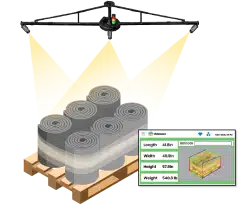
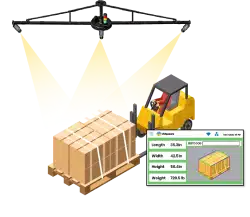
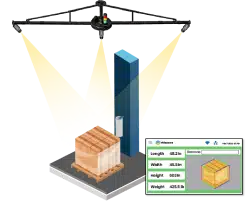
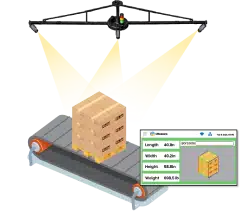
An integrated pallet measurement system is a pallet measurement setup that captures pallet data and sends it into the warehouse systems operations already use. It works as a dimensioning data capture system that links the pallet’s length, width, height, shipment ID, image proof, and weight from a connected scale to the right operational record.
The setup usually has three parts: measurement hardware, a dimensioning data capture system, and a pallet dimensioning software platform. The hardware captures the pallet profile. The data capture layer creates the scan record. The software platform stores, formats, and makes the record searchable for operations.
In vMeasure Pallet Ultima workflows, the system captures pallet dimensions and image-linked records. vMeasure Forge, a cloud-connected dimensioning solution, stores those records and sends them to integrated systems for review, reporting, and export.
Where should an integrated pallet measurement system fit in the warehouse workflow?
How does an integrated pallet measurement system connect with WMS, TMS, ERP, and freight systems?
An Integrated Pallet Measurement System connects with WMS, TMS, ERP, and freight systems by turning pallet measurement data into a structured record and sending it through the approved integration method. The record usually starts with a shipment reference, such as a pallet ID, shipment ID, order number, BOL, AWB, PO, LPN, or control number. Once the pallet is measured, the pallet dimensioning software platform prepares that record for the system that needs it.
| Integration method | How it works | Where it fits |
|---|---|---|
|
REST API |
Sends pallet measurement records directly to approved customer software endpoints. |
Fits workflows where WMS, TMS, ERP, freight systems, or shipping software need system-to-system updates. |
|
Webhooks |
Sends the measurement result to another system after the pallet record is created. |
Fits event-based workflows where another process starts after measurement, such as shipment processing or freight review. |
|
Middleware |
Connects the pallet dimensioning software platform with one or more warehouse systems. |
Fits operations where multiple systems need the same pallet record or direct integration is not practical. |
|
CSV export |
Exports pallet measurement records in a file format used for upload, reporting, or review. |
Fits batch updates, audit files, and lower-complexity integration workflows. |
|
JSON export |
Shares structured pallet measurement data in a system-readable format. |
Fits custom software workflows, batch imports, or downstream data processing. |
|
Flat files or SFTP |
Moves approved files through a scheduled file-transfer process. |
Fits legacy warehouse systems or platforms that already depend on file-based data exchange. |
|
Browser-based workflow |
Moves measurement data into browser-based systems used by operations. |
Fits web portals, carrier tools, or shipment platforms where operators already work. |
|
Cloud dashboard |
Keeps pallet records available for search, review, reporting, and export. |
Fits operations that need visibility into measurement records before or after system update. |
In vMeasure Pallet Ultima workflows, vMeasure Forge is the cloud-connected dimensioning solution that integrates pallet measurement records with existing warehouse systems through no-code API integrations. It helps warehouse operators use the pallet dimensioner along with the systems they already work with.
What pallet data is required for WMS, TMS, ERP, and freight systems from an integrated pallet measurement system?
| System | What pallet data it requires | Why it matters |
|---|---|---|
|
WMS |
Length, width, height, shipment ID, pallet ID or LPN, location, timestamp, and measurement status. |
Helps operations update receiving, putaway, staging, storage, and dispatch records with measured pallet data. |
|
TMS |
Dimensions, actual weight, shipment reference, load ID, billable weight inputs, timestamp, and image proof. |
Supports freight planning, carrier rating, load building, dimensional weight review, and shipment documentation. |
|
ERP |
Order number, customer reference, shipment reference, dimensions, weight, invoice-related fields, and reporting fields. |
Connects pallet measurement data with orders, billing, cost allocation, customer records, and finance records. |
|
OMS |
Order ID, shipment ID, pallet reference, dimensions, scan status, and timestamp. |
Helps connect the measured pallet to the right outbound order or shipment record. |
|
Freight audit system |
Volume, actual weight, shipment reference, image proof, timestamp, scan record ID, and measurement status. |
Helps operations review billing, verify freight records, and support audit or dispute checks with measured data. |
|
Carrier or rate engine |
Length, width, height, actual weight, dimensional weight inputs, shipment ID, service type, and carrier reference. |
Supports rating, carrier-facing shipment records, and charge validation before freight moves. |
|
Billing system |
Shipment reference, dimensions, weight, billable weight inputs, customer reference, and invoice-related fields. |
Helps billing records use measured pallet data instead of estimated or manually entered values. |
|
Reporting dashboard |
Site ID, device ID, operator ID where required, timestamp, measurement status, and scan record ID. |
Helps operations review measurement activity across shifts, stations, and warehouse locations. |
What should IT and operations validate before integration go-live?
- Check the integration setup your warehouse requires, such as API, webhook, middleware, CSV, JSON, flat file, or SFTP.
- Confirm network access, authentication, user permissions, and system access.
- Test the type of pallets that your warehouse regularly handles.
- Match the key fields your systems need, including dimensions, weight, shipment reference, timestamp, image link, and status.
- Send test records and compare the cloud platform record with the connected system record.
- Walk through the floor process with your operators, including pallet stop point, ID entry, measurement, review, and exceptions.
- Test the scale connection separately if weight is part of your workflow.
- Review how incomplete, duplicate, failed, or missing records are handled.
How does vMeasure pallet ultima fit into integrated pallet measurement workflows?
vMeasure Pallet Ultima fits into an Integrated Pallet Measurement System as the pallet scan station that captures a complete pallet record and links it to the pallet ID or order number. The measurement becomes part of the warehouse or freight record instead of staying as a separate manual entry.
Talk to the dimensioning experts
What do our customers say?

Bargain Book Stores

Holisol

Pidge