
Dimensioners that measure anything from parcels to pallets
vMeasure Dimensioner

Freight Dimensioning and Weighing System: How It Improves Shipment Records

Home Content Guides Freight Dimensioning and Weighing System: How It Improves Shipment Records

Most freight discrepancies are not caught at the dock. They surface weeks later during a billing dispute, freight audit, or damage claim, when the only record of what actually shipped is a rough estimate, a manual entry, or an incomplete shipment note.

A freight dimensioning and weighing system fixes this at the source by replacing manual entry with a complete, accurate shipment record captured before freight leaves the dock. The record holds up because it was built right the first time, not reconstructed after a dispute begins.

What is a freight dimensioning and weighing system?

vMeasure enterprise dimensioning solution software integration

A freight dimensioning and weighing system captures the length, width, height, and actual weight of freight in the same measurement workflow. For palletized freight, the system works at a fixed measurement station where the freight load stops before receiving, staging, shipping, billing, or carrier handoff.

The freight dimensioning and weighing solution captures freight size and shipment images, while a connected scale, such as a floor scale or platform scale, adds actual weight to the same record.
The system links the captured data to a shipment ID, order number, or pallet ID, turning a basic measurement into a complete shipment record that warehouse teams use beyond the dock.

How does a freight dimensioning and weighing system improve shipment records?

A freight dimensioning and weighing system improves shipment records by capturing freight measurements, actual weight, shipment references, images, and scan details in one workflow. This gives warehouse, billing, audit, and support teams one reliable record instead of separate manual notes, scale readings, spreadsheets, and photos.
The system accurately captures both standard and irregular palletized freight, including overhang and oversized loads. This helps warehouse teams identify exceptions early, rebuild the load if needed, and keep the final shipment record aligned with the freight that actually leaves the dock.
When the captured data moves into integrated warehouse, transport, shipping, or audit systems, teams avoid repeated manual entry and use the same freight record for billing review, carrier communication, freight audit, and customer proof.
Create complete freight records in one workflow.

Why should freight dimensions and actual weight be captured together?
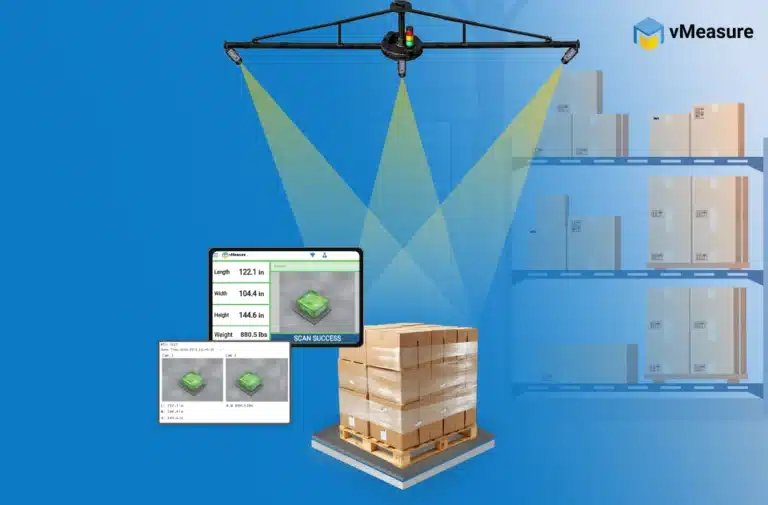
Freight dimensions and actual weight need to be captured together because freight records need both space and weight data. Dimensions show how much space the shipment occupies. Actual weight shows how heavy it is. Together, they support freight density, NMFC class review, dimensional weight, billable weight, and billing checks.
When dimensions and weight are captured separately, warehouse teams need to match two different records later. A pallet may be measured at one point, weighed at another, and entered into a system after that. This increases the risk of data mismatch, missed scale readings, and retyping errors.
Capturing both values in the same workflow gives downstream systems complete freight data. TMS, carrier rating, freight audit, and billing teams use one freight record instead of comparing separate dimension and weight entries later.
vMeasure freight dimensioning system integrated with floor scale

What data does a freight dimensioning and weighing solution capture?

A freight dimensioning and weighing solution captures more than dimensions and weight.
A complete record usually includes:
  • Dimensions: Records the freight’s outer size profile for shipment documentation and space review.
  • Actual weight: Connects scale weight to the same freight record.
  • Barcode or shipment ID: Links the scan to the pallet, order, shipment, BOL, AWB, LPN, or customer reference.
  • Timestamp: Shows when the freight was measured.
  • Images: Documents what the freight looked like at scan time.
  • Operator, station, or device details: Helps teams trace where and how the scan was captured.
  • Scan history: Helps teams review past records by shipment or pallet reference.
  • Exportable data: Prepares the record for reporting or system use.
Together, these fields create a complete freight shipment record because they connect the freight measurement, actual weight, shipment identity, image proof, scan context, and system-ready data in one place.

This data structure is what separates a pallet freight measurement system from a simple manual measurement step. The record does not end with the measured values. It includes the proof and identifiers needed to review the freight record later.

Choose a freight dimensioning system that captures more than freight size.

How does freight dimensioning data sync with WMS, TMS, or shipping software?

Freight dimensioning data syncs with WMS, TMS, ERP, rate engines, carrier platforms, or shipping software through APIs, webhooks, CSV exports, JSON exports, flat files, or browser-based workflows.

The data flow works in three steps:

  • The freight dimensioning and weighing solution captures the scan data and stores it locally or in the cloud, based on the setup.
  • The system transfers the data in the format and workflow the warehouse requires.
  • The integrated WMS, TMS, shipping, billing, or audit system receives the shipment record without warehouse operators retyping the data.

The integration method depends on how the warehouse needs to use the data. APIs and webhooks support real-time data flow between the measurement system and warehouse or shipping systems. CSV, JSON, and flat-file exports support structured reports, audit files, batch uploads, scheduled updates, or simpler system updates.

With this sync, the shipment record moves from the scan point into the integrated system, helping warehouse operators complete the workflow with fewer manual steps.

Why are shipment images important in freight records?
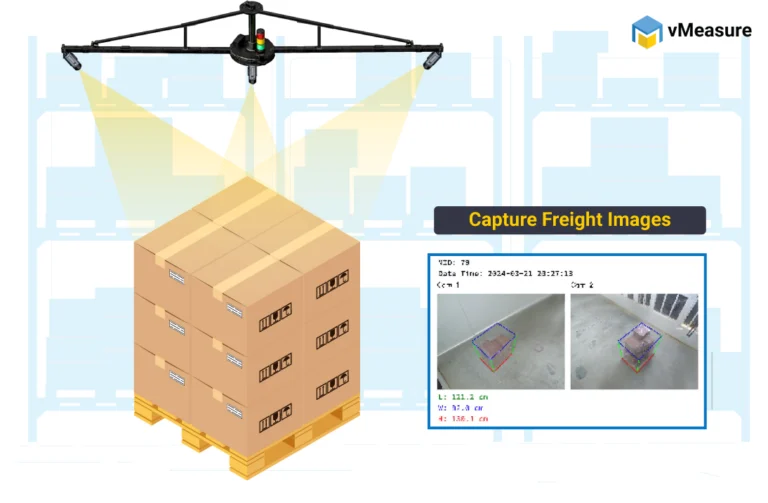
vMeasure freight dimensioning system captures image for freight verification
Shipment images are important because they show what the freight looked like at the time of scan. Measurement values show size and weight. Images add visual proof for condition, overhang, wrapping, visible protrusions, labels, and shipment state.
A freight dimensioning and weighing solution with image capture helps warehouse operations review questions after the freight has moved. This becomes important when a carrier adds extra handling charges, accessorial charges, or other freight charges that are difficult to defend without an image tied to the freight record.
Images do not replace dimension and weight data. They improve the shipment record by showing the freight condition behind the measured values.

How does a freight dimensioning and weighing system help with freight audit and billing validation?

A freight dimensioning and weighing system helps freight audit and billing validation by creating a scan record that warehouse operations can compare against reweighs, redims, carrier corrections, invoices, and internal billing records.
The record links measured dimensions, actual weight, shipment reference, timestamp, and image proof before dispatch or carrier handoff. This helps audit and billing teams check billed dimensions, dimensional weight, actual weight, billable weight, and applied corrections from one record.
If a correction or dispute appears later, warehouse operations do not have to rely on manual notes or separate scale readings. The freight record gives reviewers the measured freight profile, scale-based weight, and shipment proof needed to review the charge.
Make freight audit and billing checks easier with accurate shipment records.

When should a warehouse or cross-dock use a freight DWS machine?

A warehouse or cross-dock should use a freight DWS machine when manual measurement slows dock activity, creates data-entry errors, or makes shipment proof difficult to find later. It is useful when freight needs to be measured, weighed, documented, and moved into downstream workflows without adding extra handling steps.
A freight dimensioning and weighing system fits well at points where freight already stops. Common locations include receiving, staging, audit stations, dock checkpoints, scale stations, wrapper stations, cross-dock lanes, and outbound shipping points.
By capturing the freight record at a natural stop in the flow, warehouse operations measure and document freight before it moves to storage, staging, cross-dock transfer, lane sorting, dispatch, carrier handoff, or another downstream process.

How does a freight dimensioning and weighing system improve freight records for freight forwarding, CFS, and air cargo operations?

A freight dimensioning and weighing system improves freight records for freight forwarding, CFS, and air cargo operations by capturing shipment size, actual weight, images, and reference data before cargo moves to consolidation, documentation, billing, screening, or carrier handoff.
These operations handle mixed cargo profiles, including palletized freight, crates, cartons, irregular cargo, and consolidated loads.
The record supports different workflows:
  • Freight forwarding: Links measurements to shipment IDs, customer references, house bills, warehouse receipts, or AWB details.
  • CFS operations: Supports import, export, consolidation, deconsolidation, storage, and release workflows.
  • Air cargo operations: Supports chargeable weight review, cargo documentation, fit review, carrier records, and customer proof.
In these environments, the freight dimensioning and weighing system improves the shipment record by keeping cargo measurement, weight, visual proof, and shipment references tied to the same cargo movement.
Capture cleaner cargo records for freight forwarding, CFS, and air cargo.

How does a freight DWS system help verify shipments and provide customer proof?

A freight DWS system helps verify shipments by tying the measurement event to the correct shipment reference. The record shows what was scanned, when it was scanned, what dimensions were captured, what actual weight was recorded, and what the freight looked like at that time.
This supports customer proof because warehouse operations or customer support can look up the shipment record later instead of searching through emails, phone photos, handwritten notes, or separate spreadsheets. If a customer asks about freight size, visible condition, overhang, label visibility, or shipment state, the scan record gives them a clearer basis for review.

How does vMeasure pallet ultima fit into freight dimensioning and weighing workflows?

vMeasure Pallet Ultima fits into freight dimensioning and weighing workflows as a fixed, camera-based pallet and freight dimensioning system. It helps warehouse operations capture accurate freight dimensions in less than 2 seconds, along with image records, shipment references, timestamps, and actual weight when connected to a compatible and validated scale.

The system supports both standard and irregular palletized freight, including protrusions and high cube freight.
The system links each scan to references such as pallet ID, shipment ID, order number, BOL, AWB, PO, LPN, or control number. This turns the scan into a usable freight record for billing validation, audit review, carrier records, shipment verification, and customer proof.

vMeasure Forge, a cloud platform, helps move scan records into existing warehouse and freight workflows through no-code API integrations, webhooks, middleware, CSV export, JSON export, browser-based workflows, and flat files. This helps warehouse operations connect freight records with the existing WMS, TMS, ERP, shipping software, billing tools, and freight audit workflows.

Talk to the dimensioning experts

Still unsure about procuring our dimensioning system for your operations to capture the accurate dimensions, weight, and volume of your SKUs or parcels?

What do our customers say?​