
What is a freight dimensioner, and how does it measure freight faster and more accurately?
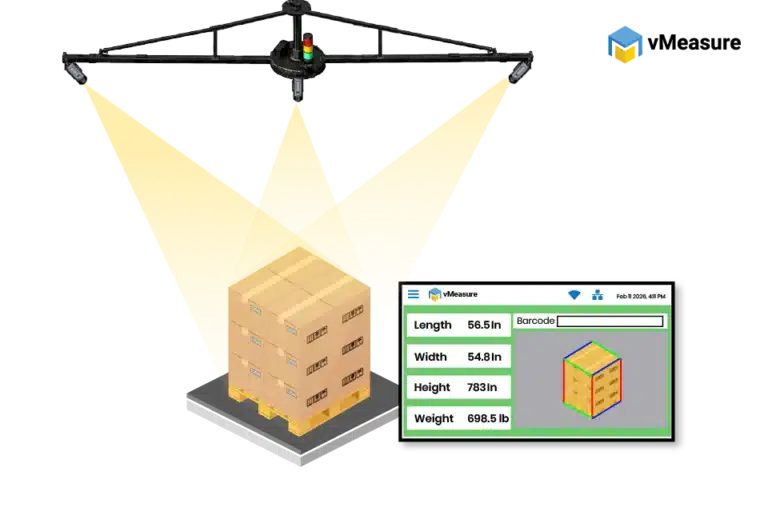
A freight dimensioner capture the length, width, and height of palletized freight. It uses cameras, sensors, lasers, or 3D scanning technology to get accurate freight dimensions in seconds.
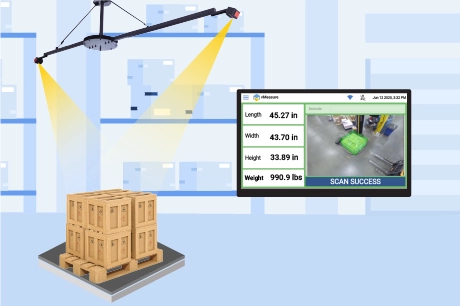
The workflow is simple. The operator places the freight in the scan zone and scans or enters a shipment reference, such as a pallet ID, order number, or barcode. The freight dimensioner then captures the freight profile, calculates the dimensions, and links the measurement to the shipment record.
By capturing the full outside freight profile in a repeatable way, a freight dimension scanner helps warehouses create cleaner measurement records, move freight through receiving or dispatch faster, and give shipping, billing, and audit teams more reliable freight data.
Where does a freight dimensionalizer fit in existing warehouse and freight workflows?
A freight dimensionalizer should fit into the warehouse flow without forcing a major floor redesign. For many buyers, the concern is not only the size of the equipment. The bigger question is whether the system can be placed around the space, structure, and pallet movement already available in the facility.
| Mounting option | When it fits | Clear measurement space required |
|---|---|---|
|
Wall mount |
When the scan zone is near a strong wall that can support the mounted structure |
Pallet measurement area in front of the wall |
|
Ceiling mount |
When the warehouse has suitable overhead structure and enough vertical clearance |
Floor space below the camera view |
|
Column or beam mount |
When a structural column or I-beam is close to the measurement area |
Scan zone around the column or beam |
|
Floor mount |
When the site does not have a usable wall, ceiling, column, or beam near the scan zone |
Floor space for the mount and pallet area |
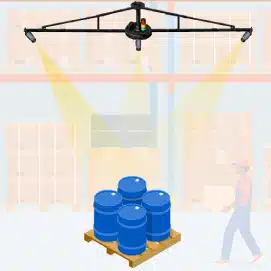
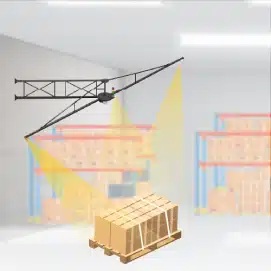
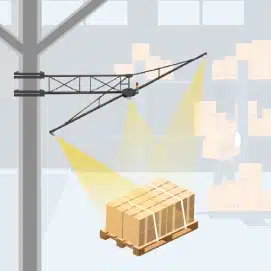
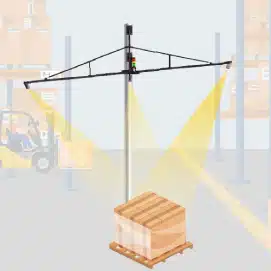
For vMeasure Pallet Ultima, buyers should plan for 15 ft × 15 ft of clear measurement area around the scan zone. This is not the hardware footprint alone. It is the working area needed for pallet placement, camera visibility, and safe freight movement during measurement.
What freight types and sizes can a freight dimensioner measure?
2-camera setup for regular or standard freight
3-camera setup for mixed, irregular, or larger freight
In an automated pallet dimensioner quote, buyers should check which items are included and which items are optional, so a low upfront price does not hide extra costs later.
| vMeasure freight dimensioner | ||
|---|---|---|
|
Minimum Dimensions (L – W – H) |
9.4 – 9.4 – 4.7 in 0.8 – 0.8 – 0.4 ft 24 – 24 – 12 cmhidden texttx |
|
|
Maximum Dimensions (L – W – H) |
98.4 – 98.4 – 98.4 in 8.2 – 8.2 – 8.2 ft 250 – 250 – 250 cmhidden text |
|
|
Measurement Accuracy |
Length & Width – 2 cm / 0.8 in Height – 1 cm / 0.4 in |
|
|
Dimensioning Timehidden |
2-3 seconds |
|
|
Installation Height |
4.1 m / 13.4 ft (Complete Setup) |
|

| vMeasure freight dimensioner | ||
|---|---|---|
|
Minimum Dimensions (L – W – H) |
9.4 – 9.4 – 4.7 in 0.8 – 0.8 – 0.4 ft 24 – 24 – 12 cmhidden texttx |
|
|
Maximum Dimensions (L – W – H) |
154 – 150 – 134 in 13 – 12 – 11 ft 390 – 380 – 340 cmhidden text |
|
|
Measurement Accuracy |
Length & Width – 2 cm / 0.8 in Height – 1 cm / 0.4 in |
|
|
Dimensioning Timehidden |
2-3 seconds |
|
|
Installation Height |
5 m /16 ft (Complete Setup) 4 m / 13 ft (Camera Height) |
|
What records should a freight dimensioner capture beyond dimensions?

- Weight when the dimensioner is integrated with a compatible scale
- Shipment reference such as pallet ID, shipment ID, order number, BOL, AWB, PO, LPN, or control number
- Timestamp to show when the freight was measured
- Image-linked records to show how the pallet looked at the time of scan
- 360-degree freight image to give a fuller view of the pallet for review
- Exportable scan data so the record can move into reporting or system workflows
Additional cameras are important when one view is not enough. They help capture side barcodes, shipment labels, stretch-wrapped surfaces, visible overhang, freight condition, and extra pallet angles that may not be visible from the main measurement view.
How does a freight dimensioner integrate with existing warehouse and freight systems?
Hardware integration
Hardware integration links the freight dimension scanner with the equipment already used in the warehouse. It helps operators measure freight without changing the way pallets already move through the floor.
| Hardware | What it integrates with | How it improves warehouse operation |
|---|---|---|
|
Floor scale |
Dimensioning and weighing at the scan point |
Captures size and weight in the same workflow |
|
Forklift scale |
Weighing during pallet movement |
Reduces extra pallet handling before measurement |
|
Stretch wrapper |
Measurement near the wrapping point |
Uses a location where the pallet already stops |
|
Inline system |
Fixed scan position in an automated flow |
Supports faster freight movement with less manual handling |
|
Additional cameras |
Extra label, barcode, and image angles |
Adds additional proof for audits, disputes, and freight verification |

Software integration
Software integration links the freight dimensional scanner with existing warehouse systems such as WMS, TMS, ERP, OMS, carrier platforms, freight audit tools, billing systems, reporting dashboards, and customer portals. It moves scan data directly into shipment workflows, reducing manual entry and retyping errors.
| Connection | How it is established |
|---|---|
|
REST API |
Sends live scan data to approved customer software endpoints |
|
Webhooks |
Pushes scan results to another system after measurement |
|
Middleware |
Acts as a bridge when direct system integration is not the easiest path |
|
CSV export |
Exports scan records for review, upload, or reporting |
|
JSON export |
Shares structured scan data for batch uploads or downstream imports |
|
Browser-based workflow |
Moves measurement data into browser-based systems |
|
Flat files |
Shares scan records through approved file-based transfer workflows |
vMeasure Forge, a cloud-based software platform, integrates with existing warehouse systems to send captured frieght record through no-code API integrations, middleware, webhooks, CSV or JSON export, browser-based workflows, and flat files.
What should buyers check before choosing a freight dimensioner?
| Evaluation area | What buyers should confirm |
|---|---|
|
Freight fit |
The system matches the freight types and size ranges handled most often |
|
Camera setup |
The setup supports the level of coverage needed for regular, mixed, irregular, or high-cube freight |
|
Workflow placement |
The scan point fits into the existing pallet movement without slowing the floor |
|
Record capture |
The system creates the shipment records needed for audit, billing, carrier handoff, and internal review |
|
Hardware integration |
The dimensioner works with the weighing, wrapping, camera, or inline workflow already used in the warehouse |
|
Software integration |
Scan data moves into the systems that already manage orders, shipments, billing, reporting, or freight audit |
|
Operator usability |
The process is simple enough for operators to use without going back to manual measurement or re-entry |
|
Support and deployment |
Site review, installation, calibration, testing, and support steps are clear before go-live |
What does vMeasure Pallet Ultima add beyond basic freight dimensioning?
vMeasure Pallet Ultima measures regular and irregular palletized freight using a fixed camera-based dimensioning system. It supports both 2-camera and 3-camera setup options for standard, mixed, larger, and high-cube palletized loads.
Talk to the dimensioning experts
What do our customers say?

Bargain Book Stores

Holisol

Pidge