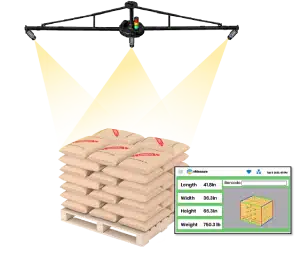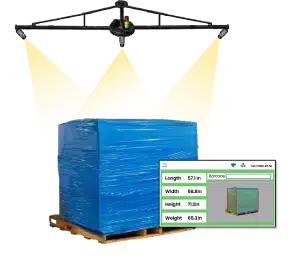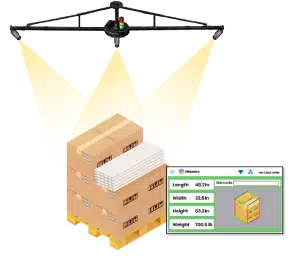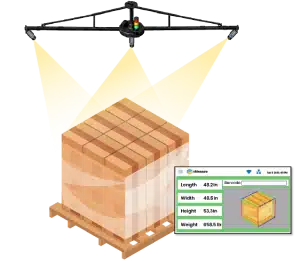
Dimensioners that measure anything from parcels to pallets
vMeasure Dimensioner

What Should Multi-Site Warehouses Look for in Enterprise Pallet Dimensioning Systems?

Running one warehouse is a measurement problem. Running five, ten, or twenty locations is a systems problem.
When pallets move through multiple sites, inconsistencies build up quickly. One site measures manually. Another uses a handheld device. Another has a dimensioner that does not connect to the WMS. When a freight dispute appears later, there is no single source of truth, only different records from different locations.
That is exactly what enterprise pallet dimensioning systems are built to solve. It standardizes how every site captures, records, and reports pallet dimensions, weight, images, and shipment data.

What is enterprise pallet dimensioning systems?

An enterprise pallet dimensioning systems are measurement setups used when pallet freight moves through more than one warehouse.

It records pallet length, width, height, weight, images, timestamps, and shipment details in one structured record. The goal is to keep pallet measurement data consistent across locations instead of letting each site create its own version of the data.

For larger freight operations, pallet dimensioning does not stay only on the warehouse floor. The data moves into shipping, billing, reporting, and carrier review workflows, so the record needs to stay consistent from capture to review.

vMeasure Pallet Dimensioner captures pallet dimensions, weight, and image records, then connects that data with warehouse and shipping systems.
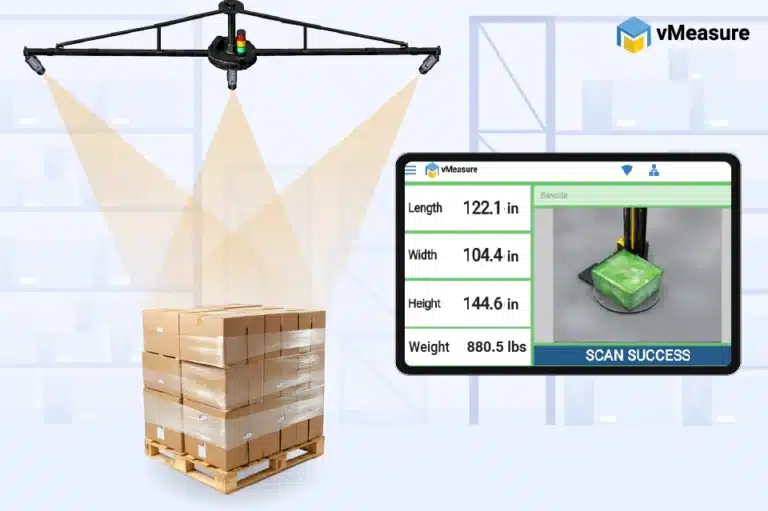
vMeasure enterprise pallet dimensioning systems

Why do multi-site operations need an enterprise dimensioning approach?

Multi-site operations need an enterprise dimensioning approach because pallet data has to remain comparable from one warehouse to another.
If every site measures pallets in its own way, the records become messy fast. One site records dimensions and weight. Another site records only dimensions. Another site may skip images or leave audit details incomplete.
That leaves a gap between what happened on the warehouse floor and what the central operation reviews later.
Enterprise pallet dimensioning systems give every site the same measurement process, data structure, and record format.

Still depending on manual pallet checks across multiple sites?

Watch how vMeasure captures pallet dimensions, weight, and image records in under 2 seconds, without adding another manual step to the workflow.

What should multi-site operations evaluate in an enterprise pallet dimensioning systems?

When you compare enterprise dimensioning solutions, do not evaluate only the measuring device. Look at the full workflow.

The right system should give each site accurate pallet measurements, handle busy freight movement, connect with the software already in use, and keep records in one place.

This checklist gives buyers a practical way to compare enterprise dimensioning solutions before they start a rollout.

Buyer’s evaluation checklist

Evaluation criteria Why it matters for multi-site operations What to ask the vendor
Throughput capacity
Keeps pallet measurement from slowing busy sites.
How many pallets per hour or shift does one installation support?
Measurement accuracy
Keeps pallet data consistent across locations and load types.
What accuracy level applies to standard, wrapped, and irregular pallets?
WMS, ERP, and TMS integration
Moves pallet data into existing warehouse, shipping, and freight workflows.
Which enterprise systems have you already integrated with?
API connectivity
Reduces manual export and keeps data moving in real time.
What API, webhook, or export options are available?
Cloud dashboard
Gives central users one view of site activity and measurement history.
Can every location be viewed from one dashboard?
Data governance
Controls access, audit trails, image records, and retention rules.
How is access managed at site and enterprise level?
Deployment timeline
Gives the rollout clear phases across multiple locations.
What does a rollout across 5 or 10 sites look like?
Certification needs
Matters when data supports billing or regulated workflows.
Is the system OIML or NTEP certified where required?
Support model
Keeps devices, integrations, and reporting stable after go-live.
What SLA, maintenance, and escalation support are included?
Total cost of ownership
Shows the real cost across hardware, software, support, and expansion.
What is the full annual cost per site?

vMeasure enterprise pallet dimensioning systems supports multi-site workflows by combining pallet measurement, weighing, image capture, API integration, centralized reporting, deployment flexibility, and support coverage across warehouse operations.

The best scalable pallet dimensioner system is not only the one that measures pallets. It is the one that keeps pallet records, reports, and system connections working the same way across all warehouses.

Comparing multiple pallet dimensioning systems?

See how vMeasure fits into your warehouse workflow. Book a demo to review the right enterprise pallet dimensioning setup for your operation.

Measurement accuracy and repeatability

Pallet measurement accuracy matters because the data ends up in billing, carrier review, storage planning, or shipment records. For multi-site operations, the same pallet should not produce a different record just because it was scanned by another operator or at another warehouse.
How an operator measures, how the site is laid out, or what type of freight is being handled should not change the way the data is captured.
Focus on the areas that usually affect record quality:
  • Length, width, height, and weight capture
  • Wrapped pallets, overhang, and uneven edges
  • Images, timestamps, and shipment details in the record
  • Calibration or validation requirements

A basic pallet scanner may be enough for one warehouse. A multi-site buyer needs repeatability across locations, freight types, and operators.

vMeasure enterprise pallet dimensioning systems
vMeasure enterprise pallet dimensioning hardware specifications
Maximum Dimensions
(L – W – H​)
154 – 150 – 134 in
13 – 12 – 11 ft
390 – 380 – 340 cmhidden text
Minimum Dimensions
(L – W – H​)
9.4 – 9.4 – 4.7 in
0.8 – 0.8 – 0.4 ft
24 – 24 – 12 cmhidden texttx
Measurement Accuracy​
Length & Width – 2 cm / 0.8 in
​ Height – 1 cm / 0.4 in​
Dimensioning Timehidden
2-3 seconds
Installation Height
5 m /16 ft (Complete Setup)​
4 m / 13 ft (Camera Height)​

Throughput and workflow fit

Throughput is not only about scan speed. The system should fit the way pallets already move through docks, floor scales, staging areas, and shipping zones.
Workflow Area What to Evaluate
Loading docks
Does the scan process fit before carrier handoff?
Warehouse floors
Does the system work without disrupting pallet movement?
Floor scales
Does the dimensioning setup align with weighing workflows?
Shipping zones
Does the record move into freight billing or shipping software?
Peak periods
Does the system keep pallets moving without manual backlog?
The right setup should keep the measurement standard consistent without forcing every warehouse into the same physical layout.
vMeasure enterprise pallet dimensioning systems at loading dock

Pallet size and load compatibility

A multi-site operation will not handle the same pallet profile at every location. The system should work with the common load types across the network, not only clean, standard pallets.

A strong industrial pallet dimensioning system should support:

  • Standard and oversized pallets
  • Wrapped pallets and freight with overhang
  • Mixed, tall, uneven, or irregular loads
  • High-volume industrial use

If one common load type still needs manual checking, consistency breaks at that site.
Hardware and site flexibility

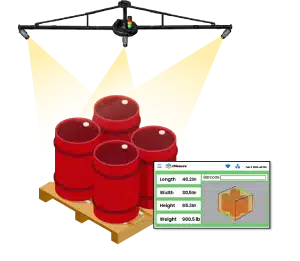
Hardware fit matters because warehouse layouts vary. One site may have open dock space, while another needs the scan zone near a floor scale or around existing freight movement.
Review only the practical setup points:
  • Sensor and camera placement
  • Mounting options and floor space
  • Fit with dock areas and floor scales
  • Power, network, and operator access around the scan area

For a multi-site rollout, hardware should not create a new layout problem at every location. The setup should adjust to each site while keeping the measurement process the same.

Different sites. Different layouts. Same measurement standard.

Talk to the dimensioning experts about building one consistent pallet measurement workflow across every location with vMeasure.

How should enterprise pallet dimensioning systems integrate with existing systems?

Enterprise pallet dimensioning systems should connect with the systems already used for freight, inventory, billing, and shipment records. Pallet data should move from the dimensioning point into the right system without manual re-entry.

WMS, ERP, and TMS integration

A pallet dimensioning system captures data at the dock, floor scale, warehouse floor, or shipping area. Once captured, the record should move into the WMS, ERP, TMS, or shipping software used in daily operations.
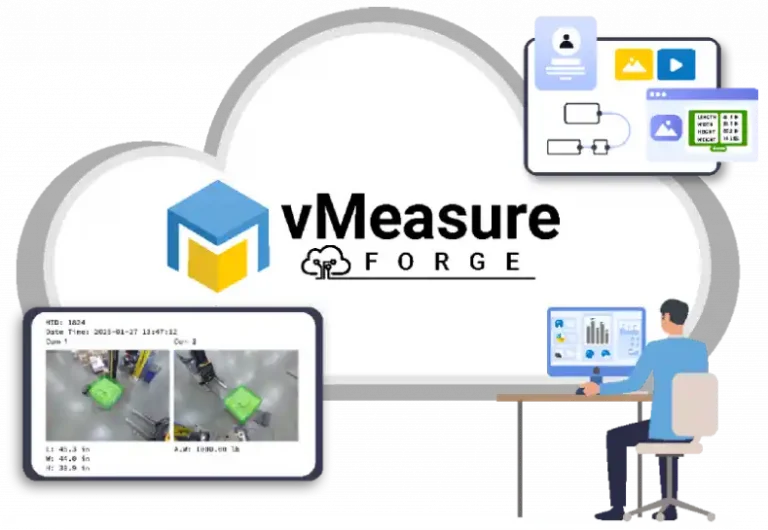
For multi-site operations, the output should stay consistent even when each site uses a different system setup or configuration.
dimensioning solution software integration

API and connectivity requirements

API connectivity should be reviewed early because integration affects the full rollout, not only the hardware setup.
Before rollout, check what happens after a pallet is scanned. The system should show how the record moves into your existing software, whether through an API, webhook, live transfer, secure cloud access, or backup export when needed.
Each scan should create one structured pallet record and send it to the right business system based on the workflow.
vMeasure enterprise dimensioning solution software integration

Data output requirements

Every pallet record should include dimensions, weight, image, timestamp, and shipment reference in a format downstream systems can read without manual cleanup.
Image records should stay linked to the pallet because dimensions give the numbers, while the image shows what was actually measured. That context matters during billing checks, carrier discussions, and internal reviews.

What should multi-site deployment and standardization look like?

Multi-site deployment has to start with the way pallets move through the warehouse, not with the hardware install. One site may scan near the dock and another near a floor scale, but the scan rules, record fields, and system handoff need to stay the same.
Use the first site to test the real workflow, fix what does not work there, then carry that process into the next locations.

Rollout planning across locations

Start with one pilot site that looks like the actual operation, not a quiet test area. It should have normal pallet movement, regular operators, live system connections, and the same record requirements expected at other sites.
Before the next site goes live, check the practical items at the pilot location:
  • Space, power, network, and scale access are available where the scan happens
  • Sensors, cameras, mounts, and scan zones fit the floor layout
  • Pallet data reaches the WMS, ERP, TMS, or shipping software correctly
  • Operators know how to scan, review, and flag an issue
  • The final record looks right before the rollout is repeated

Standardizing dimensioning workflows

Standardization is not about making every warehouse look the same. It is about keeping the measurement rules the same.
One site may scan near a dock. Another may scan near a floor scale. That is fine, as long as the pallet record is created the same way at every location.
Each site should follow the same rules for:
  • When the pallet is measured
  • Which fields are required
  • How weight, images, and shipment IDs are linked
  • Where the record goes after capture
  • Who reviews incomplete or failed records

Compliance and certification considerations

Compliance should be checked before rollout when pallet data is used for billing, carrier review, or legal-for-trade workflows. The required level may vary by site, depending on how the dimension and weight data is used.
Review:
  • Legal-for-trade requirements
  • OIML or NTEP requirements where applicable
  • Scale certification
  • Calibration and maintenance records
Each site should keep basic documentation for calibration, maintenance, measurement history, and audit review.
vMeasure cloud SOC 2 certified cloud based dimensioning solution

Planning a pallet dimensioning rollout across multiple sites?

See how vMeasure fits into your warehouse network. Book a demo to review the right rollout, training, and compliance-ready setup for your operation.

How should centralized reporting and data governance work?

Centralized reporting should give enterprise users one place to review pallet measurement activity across all locations. Each site should send records into the same reporting structure, so central users can compare sites without collecting separate local reports.

Cloud dashboard and multi-site visibility

A cloud dashboard should show pallet measurement activity across sites from one place. Local users may only need records from their own warehouse, while central users need a wider view across the full network.
A useful dashboard should show:
  • Active devices by site
  • Pallets measured by location
  • Measurement history
  • Records with dimensions, weight, images, timestamps, and shipment reference
  • Device usage and health status
vMeasure pallet dimensioning system links pallet dimensions, weight, images, and timestamps to a centralized platform. That gives each site a structured way to record pallet data while central users keep network-level visibility.

Audit trails and record governance

Audit trails matter when pallet data is used for freight billing, carrier reviews, shipment checks, or internal audits. Each pallet record should stay tied to the shipment reference, so the right record is easy to find later.
Data governance should define who can view, export, manage, and retain records. Access rules should follow the way the records are used. A warehouse user usually works with records from one location. Central operations need the full site view. Finance looks at exports for billing review, and IT handles user access, permissions, and data movement.
See how vMeasure captures pallet measurements in a real warehouse workflow.
Watch the vMeasure Enterprise Pallet Dimensioner demo to see how pallet dimensions, weight, and image records are captured in under 2 seconds.

What do enterprise pallet dimensioning systems cost?

The cost of enterprise pallet dimensioning systems changes with the setup, number of sites, and integration work. For a multi-site rollout, you need to look beyond the device and include installation, software access, reporting, support, maintenance, training, and future expansion.
When you compare pricing, review these items first:
  • Fixed scan point or automated pallet dimensioning setup
  • Number of warehouse locations included in the rollout
  • Accuracy needs and any certification requirement
  • WMS, ERP, TMS, or shipping software connection
  • Cloud dashboard access, reporting, and record storage
  • Support, maintenance, training, and software licensing
Pricing also depends on how the vendor structures the model. Some vendors price each site separately. Some use an enterprise license. Some offer an OpEx or subscription-based plan.
For a rollout across several warehouses, OpEx pricing is easier to plan because the cost is spread across a monthly or annual period. It also reduces the upfront spend, which makes approval easier when more than one location is involved.
With vMeasure’s OpEx model, businesses reduce the upfront investment and support ROI within 4 to 6 months through optimized shipping costs, fewer carrier chargebacks, and reduced penalty costs.
ROI usually comes from practical improvements. Less manual measurement work. Fewer billing corrections. Faster pallet processing. Cleaner dimension, weight, and image records across sites.
The better way to review cost is through total cost of ownership, payback period, and operational savings across the full warehouse network.

Talk to the dimensioning experts

Still unsure about procuring our dimensioning system for your operations to capture the accurate dimensions, weight, and volume of your SKUs or parcels?

What do our customers say?​