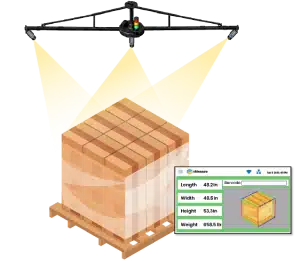
Dimensioners that measure anything from parcels to pallets
vMeasure Dimensioner

Cloud-Connected Dimensioning Solution: How Measurement Records Stay Accessible

A pallet leaves the warehouse on Tuesday. Three weeks later, a carrier disputes the shipment, or a customer asks for proof of shipment.
At that point, your warehouse operators have to search through local folders, message other departments, or rely on someone’s memory to find where the record was saved.
That is the gap a cloud-connected dimensioning solution solves. By searching with a pallet ID or shipment ID, operators retrieve the entire record from anywhere, whenever access is needed.

What is a cloud-connected dimensioning solution?

A cloud-connected dimensioning solution captures pallet or freight dimensions and saves the measurement as a digital record in cloud-based software. Instead of leaving the scan result on a local device, paper note, or spreadsheet, it gives warehouse operators a central place to search, review, and share the record later.

This matters because pallet measurement often needs to be checked after the pallet leaves the dock. Other warehouse departments may need to confirm what was measured, when the scan happened, and which shipment the record belongs to.
A complete cloud measurement record usually includes the fields that help warehouse operators understand the measurement and trace it back to the correct shipment.
Cloud record field Why it matters
Length, width, and height
Shows the measured pallet size
Actual weight
Supports billing review and shipment validation.
Shipment ID or pallet ID
Links the scan to the correct shipment or pallet.
Timestamp
Shows when the pallet was measured.
Image proof
Shows what the pallet looked like during measurement.
Scan history
Shows whether the pallet was measured, remeasured, or reviewed.
Site or location
Identifies where the scan happened.
Device or station ID
Traces which measurement station created the record.
Measurement status
Shows whether the record is complete, flagged, or ready to use.
When these fields stay tied to a shipment ID or pallet ID, the record remains useful after the pallet leaves the dock, not only during the measurement step.
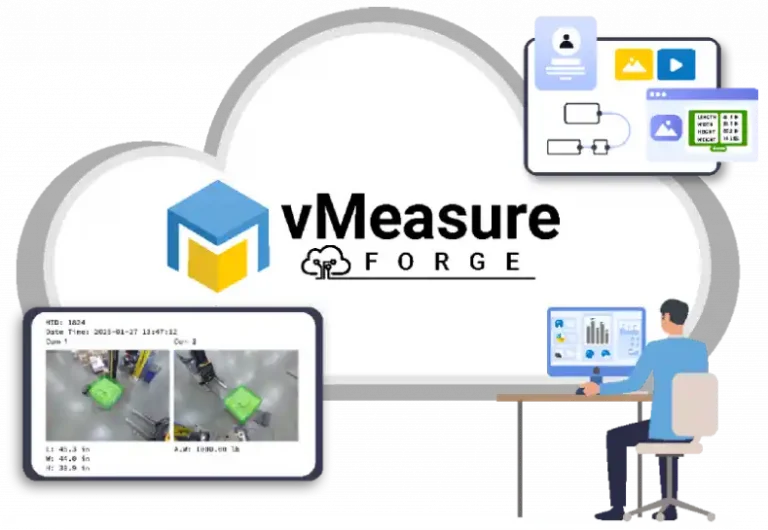
vMeasure Forge is the cloud-connected dimensioning solution that links each pallet record to its shipment ID or pallet ID. It organizes pallet measurement records so warehouse operators access the right record when review, sharing, or audit access is needed.
vmeasure shrink wrap

How are pallet measurement records stored in the cloud?

Pallet measurement records are stored by creating one digital scan entry for each measured pallet. That entry is linked to a shipment ID, pallet ID, barcode, or another reference used in the warehouse workflow.
From an operations view, the storage flow is simple:
  1. The pallet is placed at the measurement station.
  2. The operator scans or enters the shipment ID, pallet ID, or barcode.
  3. The dimensioning system captures the pallet measurement.
  4. The software adds the supporting scan details to the same entry.
  5. Once the scan is complete, the record is saved in the cloud.
This gives your warehouse operators one complete record for that pallet, instead of measurement details sitting across separate systems.

How does a cloud dashboard make pallet records easier to search and retrieve?

A cloud dashboard makes pallet records easier to search and retrieve by turning each cloud record into a searchable entry instead of a static scan output.
Instead of scrolling through a long scan list, operators use the reference already used in the workflow, such as a shipment ID, pallet ID, barcode, order number, scan date, site, device, or scan status. The dashboard then brings up the matching pallet record from the cloud.

This is where pallet measurement software becomes useful beyond the measurement station. The pallet dimensioner with data capture creates the record, and the cloud dashboard helps warehouse operators find that record when it is needed later.
vmeasure pallet measurement software
Make pallet records easier to retrieve when proof is needed.

How does cloud access give multi-site visibility into pallet records?

When your operation runs across more than one warehouse, pallet records need to be visible beyond the site where the scan happened. Cloud access helps supervisors, freight departments, and operations managers view pallet measurement activity across warehouses, docks, devices, and scan stations from one dashboard.
For example, a 3PL can compare scan activity across warehouses. A freight forwarding operation can pull shipment proof from different dock locations. A manufacturer can check outbound pallet records from different shipping areas without asking each location to send a separate file.
This gives warehouse operations multi-site visibility while keeping pallet records consistent across locations.

How does cloud access support audit review and record sharing?

Cloud access supports audit review by giving approved users access to the same pallet measurement record when a freight charge, carrier correction, customer question, or internal audit needs review. Instead of rebuilding the scan context through follow-ups and memory, your warehouse operators can search the scan history and use the original cloud record.
This is useful because freight questions often come up after the pallet has already left the dock.
Cloud access supports record sharing in situations such as:
  • Freight audit review
  • Carrier redim or reweigh questions
  • Customer shipment questions
  • Internal reporting
  • Damage or shortage review
  • Retail or customer compliance review
  • Record access for freight, finance, customer support, and warehouse operations
  • Backup exports before the retention period ends

A dimensioning data capture system also needs to make records usable outside the dashboard. CSV export helps with spreadsheet review, freight audit checks, customer reporting, and backup. JSON export helps when structured scan data has to move into reporting tools or downstream workflows. API integration is useful when the record has to move into systems such as WMS, TMS, ERP, freight audit, billing, or reporting tools.

Access control keeps that sharing practical. Warehouse operators capture scans, supervisors review records and images, and admins manage users, devices, exports, settings, and permissions. This keeps record access controlled and helps each department get the records they need.

Review and share pallet records faster when audit questions come up.

How does vMeasure Pallet Ultima fit a cloud-connected dimensioning solution?

vMeasure Pallet Ultima fits cloud-connected dimensioning solution by capturing pallet dimensions and connecting each scan to a usable cloud record. When the workflow includes a compatible and validated scale, actual weight is also added to the same record.

vMeasure Forge works as the cloud-based dimensioning layer for these records. It gives approved users access to pallet records, images, reports, exports, and measurement data, so the record stays available beyond the scan station.

From there, the record can be used for review, sharing, reporting, CSV or JSON export, and scoped integration paths such as APIs, webhooks, flat files, or browser extension workflows. This makes vMeasure Pallet Ultima useful for warehouses that need pallet measurement data to remain accessible after the scan, not just visible at the measurement station.

Talk to the dimensioning experts

Still unsure about procuring our dimensioning system for your operations to capture the accurate dimensions, weight, and volume of your SKUs or parcels?

What do our customers say?​