
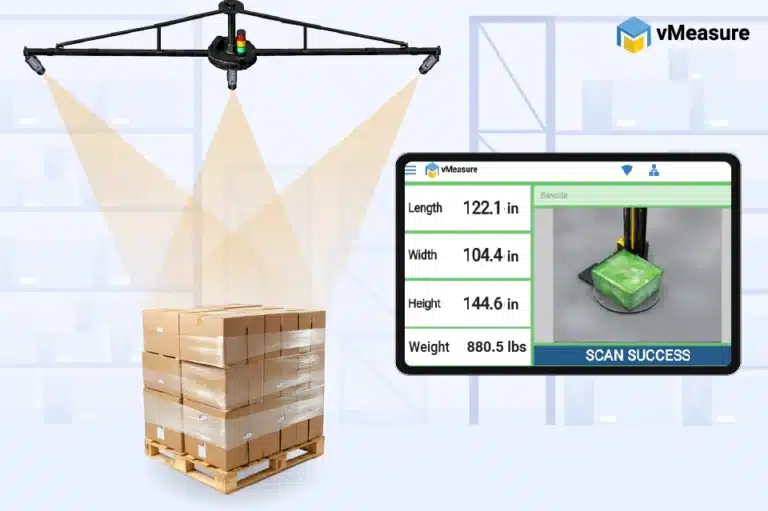
What is an automated pallet dimensioner?
An automated pallet dimensioner is a measurement system that captures the maximum length, width, and height along with weight and timestamped image proof of palletized freight in seconds. It uses cameras, sensors, or 3D imaging technology to record pallet dimensions in a repeatable workflow.
How does an automated pallet dimensioner work?
- The pallet reaches the measurement point.
- The operator then scans a barcode or enters the reference ID.
- The system captures the pallet dimensions.
- Image proof is linked to the same pallet record.
- The measurement data is stored in the software platform.
- The dimensioned data is integrated with your existing WMS, TMS, ERP, or shipping software.
When should warehouses automate pallet measurement?
- Operators are spending too much floor time measuring pallets with tape or rough visual checks.
- Dimensions are written on paper, labels, or spreadsheets, then typed again into the warehouse system.
- Pallets with overhang or irregular freight are not measured the same way every time.
- Measurement practices change from one shift, dock, or location to another.
- Pallets sit in staging, or dispatch slows down, because manual measurement takes too long.
- Billing review, carrier communication, and internal audits need freight records people can rely on.
- Receiving needs updated dimensions for storage planning, or customer reporting.
- The operation needs pallet images tied to the same record as the dimensions.
- Pallet data needs to move into a WMS, TMS, ERP, OMS, or carrier software workflow.
Where does automated pallet measurement fit in the dock workflow?
| Workflow Location | Why It Works |
|---|---|
|
Inbound receiving |
Captures pallet dimensions as freight enters the warehouse for receiving records, putaway, storage planning, and supplier validation. |
|
Scale station |
Captures dimensions and weight in one measurement flow when a compatible scale is integrated. |
|
Stretch-wrapper station |
Works well when pallets already pause for wrapping before staging or dispatch. |
|
Audit station |
Creates a documented pallet record before shipment, storage, or customer handoff. |
|
Outbound staging |
Records pallet volume and proof before the pallet moves to loading. |
|
Dock checkpoint |
Captures pallet data close to carrier handoff or receiving validation. |
|
Cross-dock flow |
Supports faster pallet data capture when inbound freight moves quickly to outbound lanes. |
For many warehouses, the best measurement point is close to the final shipping condition. If a pallet is measured too early, later changes such as stretch wrapping, repacking, overhang, or load shifting create an inconsistent and unreliable measurement record.
Is manual pallet measurement still reliable for warehouses?
Manual vs automated pallet measurement in warehouse operations
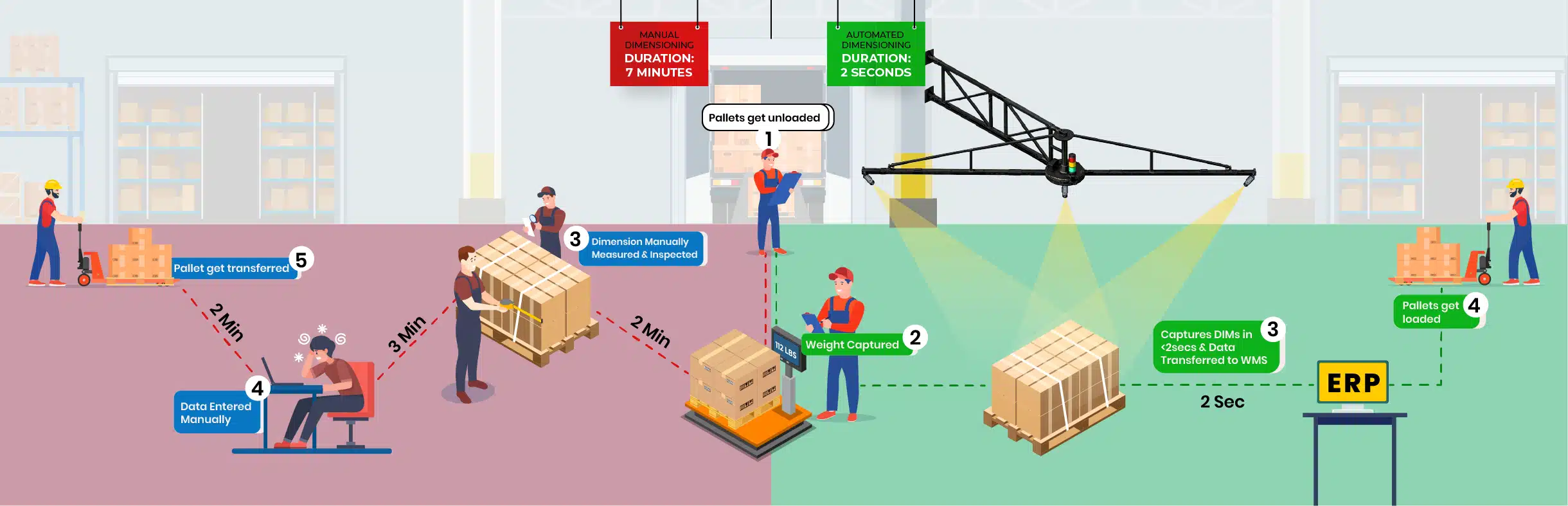
Manual and automated pallet measurement differ most in repeatability, speed, accuracy, and system connectivity. A tape measure gives a number. An automated pallet measurement system creates a reliable warehouse record.
| Area | Manual Pallet Measurement | Automated Pallet Measurement |
|---|---|---|
|
Measurement method |
Tape measure, height stick, wall mark, visual estimate |
Camera, sensor or 3D imaging measurement technology |
|
Operator dependency |
High, because operators decide measurement points |
Lower, because the station follows a repeatable capture workflow |
|
Overhang handling |
Often missed or measured inconsistently |
Captures the pallet’s outer-edge dimensions when the pallet is placed within the visible scan zone. |
|
Data entry |
Written down and typed later |
Automatic measurement data transfer to integrated warehouse systems. |
|
Pallet record format |
Often split across notes, photos, and systems |
Pallet dimensions, ID, timestamp, images, and weight data linked together in one scan record. |
|
Dock flow |
Interrupts dock flow with separate measuring and data entry. |
Fits where pallets already stop for weighing, labeling, staging, or verification. |
|
System readiness |
Requires later entry into WMS, TMS, ERP, or freight systems |
Supports export or integration workflows. |
|
Best fit |
Low-volume, simple, low-risk pallet workflows |
Repeatable warehouse workflows that require faster, more consistent pallet measurement. |
What features should warehouses look for in a pallet dimensioner?
| Feature Area | What to Review |
|---|---|
|
Dimension capture |
Complete outer dimensions of the palletized load |
|
Workflow fit |
Fit with receiving, staging, dispatch, scale, wrapper, audit, or dock checkpoint workflows |
|
ID capture |
Barcode, pallet ID, shipment ID, BOL, LPN, PO number, or other operational reference |
|
Image capture |
Default image capture and optional proof angles when visual records matter |
|
Weight capture |
Scale integration, including scale model, indicator, output mode, cable, and data format |
|
Data storage |
Searchable scan history and cloud-based measurement records |
|
Export options |
CSV or JSON export for reporting, review, and downstream workflows |
|
Integration options |
APIs, webhooks, browser-based workflows, file transfer, or other approved integration paths |
|
Site readiness |
Floor space, mounting option, power, network, forklift path, and clear field of view |
|
Scalability |
Support for repeatable measurement workflows across stations, shifts or sites when needed |
A scalable pallet dimensioner system should fit into the existing measurement point, reduce manual handling, and create a complete pallet record for freight, audit, and system workflows.
How does pallet dimensioning data flow into warehouse systems?
| Data Flow Method | How It Works | Best Use |
|---|---|---|
|
CSV or Excel export |
Exports completed scan records in spreadsheet format for manual review or upload. |
Freight audit, customer reporting |
|
JSON export |
Provides scan records in a structured format that technical systems can read. |
System ingestion, reporting tools |
|
REST API |
Sends structured scan records from the dimensioning system into integrated WMS, TMS, ERP, shipping, billing, or reporting systems. |
Live integration, automated data transfer |
|
Webhook push |
Pushes the completed scan record to a configured endpoint once measurement is completed. |
Event-based updates, shipping workflows |
|
Live measurement API |
Let’s the host system trigger a pallet measurement and receive the data result back into the same workflow. |
Controlled scan workflows, real-time data return |
|
Pull API |
Let’s the warehouse system retrieve stored scan records from the measurement database after capture. |
Record lookup, delayed processing |
|
Cloud records |
Stores pallet dimensions, images, timestamps, IDs, and scan history in a searchable cloud environment. |
Record review, multi-site visibility |
|
Browser extension |
Fills browser-based workflow fields with captured scan data when direct system integration is not the first option. |
Web-based data entry, non-API workflows |
|
SFTP or flat file |
Transfers scan records through scheduled or approved file-based paths. |
Legacy systems, batch uploads |
|
Desktop or RPA-style workflow |
Moves scan data into desktop or legacy workflows where API integration is not ready or practical. |
Desktop entry, legacy workflow support |
Where does vMeasure fit in automated pallet measurement?
vMeasure Pallet Ultima fits warehouses that need an automated pallet measurement station for faster, more consistent pallet workflows. It is suited for palletized freight that requires documented dimensions before storage, shipment, rating, billing review, compliance review, or customer handoff.
For warehouses replacing manual measurement, vMeasure Pallet Ultima adds a faster scan workflow and a searchable pallet record linked to the pallet or shipment reference. vMeasure Forge, a cloud dimensioning solution that stores scan records in the cloud and sends captured data into existing warehouse, freight, billing, and reporting systems through no-code APIs and webhooks.
Talk to the dimensioning experts
What do our customers say?

Bargain Book Stores

Holisol

Pidge