
Dimensioners that measure anything from parcels to pallets
vMeasure Dimensioner

How freight cubing software and dimensioning hardware create automated freight records

Most warehouses do not have one dimensioning problem. They usually have two separate problems that look similar until the carrier invoice arrives: a measurement capture gap and a data movement gap. Solving only one side still leaves freight records exposed to errors, missing proof, or manual correction.
Freight cubing software and dimensioning hardware each close a different part of that gap. When an operation assumes one covers both, freight costs become harder to verify, billing disputes take longer to resolve, and temporary manual workarounds stay in the process longer than expected.
This guide explains how the capture layer and software layer work together to create automated freight records that are easier to verify, move, and review.
See how vMeasure fits your pallet measurement process.

How does freight cubing software work in the warehouse workflow?

Freight cubing software is the data layer that stores, processes, and transfers freight records into WMS, TMS, ERP, shipping, billing and reporting workflows. It does not physically measure freight. It manages the record after measurement, so the capture source needs to be accurate.
Freight cubing software receives measurement data from connected dimensioning hardware, imported files, mobile workflows, or manual entry. In an automated workflow, the strongest input comes from the scan point because the freight record starts with the actual shipment, pallet, or load being measured.
In a warehouse workflow, freight cubing software keeps the record tied to the shipment instead of leaving dimensions as a separate value in a spreadsheet. A freight record includes pallet dimensions, length, width, height, actual weight, dimensional weight, billable weight, shipment ID, scan history, timestamps, export status, and linked image proof from the capture layer.
A freight dimensioning software platform manages:
  • Cloud records for scan history and review
  • API or webhook movement into WMS, TMS, ERP, OMS, shipping, or billing tools
  • CSV, JSON, or report exports
  • Linked image proof from connected hardware
  • Reporting dashboards for scan volume, record status, and exceptions

vMeasure pallet dimensioning software platform follows the same logic for palletized freight. It keeps the pallet record connected to the scan event, so dimensions, weight, ID, timestamps, and image proof stay together.

What does a freight dimensioning software platform do with captured measurements?

A freight dimensioning software platform receives captured measurements, structures them into a freight record, and sends that record into the existing system. Freight cubing software needs accurate capture data because the same data moves into billing, reporting, freight audit, and shipment verification workflows.

Question the record should answer Data field
What was measured?
Length, width, height, volume, actual weight
Which freight record does it belong to?
Shipment ID, pallet ID, barcode, reference number
When was it measured?
Timestamp, scan history, station ID
What proof is attached?
Freight image, annotated image, image link
Where should the record move?
WMS, TMS, ERP, API, webhook, CSV export
Freight cubing software is not a hardware replacement. It turns captured measurement data into a structured freight record and moves that record through the systems that use it.

What does dimensioning hardware capture freight measurements?
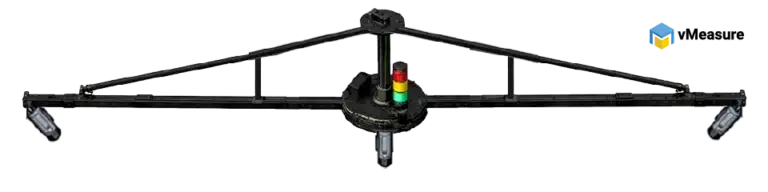
Dimensioning hardware is the physical capture layer in the freight cubing workflow. It measures freight at the scan point and creates the source data that freight cubing software stores, checks, and transfers.
For palletized freight, the hardware captures the outside profile of the load, not only the pallet base. Wrapped pallets, overhangs, and irregular freight do not always match the pallet base. The load that ships is what gets measured, reviewed, and billed, so the scan needs to capture the full freight profile.
At the scan point, the hardware captures length, width, height, weight, barcode data, timestamps, and freight images. Those details become the source record that the software uses for storage, review, reporting, and system transfer.
Dimensioning hardware comes in different types, including static stations and conveyor-based systems. In each type, the operation stays the same: capture the physical freight measurement at the scan point and provide source data for the software platform.
vMeasure pallet dimensioner hardware
See how vMeasure connects freight capture with system-ready records.

What changes when freight cubing software and dimensioning hardware work together?

Freight cubing software and dimensioning hardware solve different parts of the same workflow. Hardware captures freight measurement at the scan point. Software turns that measurement into a structured record and moves it into WMS, TMS, ERP, shipping, billing, freight audit, or reporting workflows.
A standalone capture setup gives the warehouse measurement output. A connected freight cubing workflow creates a usable freight record that moves through the systems that need it.
Criteria Disconnected hardware or software setup Combined freight cubing workflow
Workflow role
Handles one part of the process
Connects capture, record creation, and transfer
Measurement capture
Hardware captures freight measurements
Hardware captures dimensions, weight, barcode data, timestamps, and images
Record creation
Record completion happens outside the scan flow
The scan event creates a structured freight record
Data movement
Data still needs a manual or separate transfer step
Software moves records into WMS, TMS, ERP, APIs, webhooks, or CSV exports
Image proof
Proof stays separate or needs manual linking
Image proof stays linked to the scan record
Manual work
Measurement or data entry remains in the process
Measurement capture and record transfer happen in one flow
Billing and audit use
Review depends on how well the record is rebuilt later
Records stay tied to shipment ID, scan history, and proof
Automation outcome
Partial automation
Automated freight data capture and system sync
The table shows why the connected workflow matters. A standalone setup records part of the freight data, but the workflow still breaks when that data has to be copied, matched, or rebuilt later. When freight cubing software and dimensioning hardware work together, the measurement, proof, shipment ID, and system transfer stay connected from the scan point.
Watch how vMeasure connects measurement capture and freight record movement in one workflow.

Why does freight cubing automation need both software and hardware?

Freight cubing automation depends on two connected steps: capturing the freight correctly and moving that data without rebuilding the record later. Dimensioning hardware handles the scan point. Freight cubing software handles the record after capture.
When measurement is still manual, the first risk starts at capture. Length, width, height, or weight values get estimated, rounded, missed, or typed differently from one operator to another. Freight cubing software carries forward the data it receives, so inaccurate input creates inaccurate records.
When data entry is still manual, the second risk starts after capture. A hardware scan creates measurement output, but the record still needs to be matched with the shipment ID, linked to proof, and moved into WMS, TMS, ERP, shipping, billing, freight audit, or reporting workflows.
Freight cubing automation starts when both risks are removed from the same workflow. The measurement is captured at the scan point, and the record moves forward with the shipment ID, proof, and system data already connected.

How does vMeasure connect hardware and software in one freight cubing workflow?

The vMeasure freight cubing system connects dimensioning hardware and freight cubing software in one workflow. It is built for freight operations where accurate measurement capture and clean record movement need to happen together.

This is useful for palletized freight, wrapped pallets, irregular freight, staging, dispatch, cross-dock movement, and carrier handoff workflows.

Workflow step What happens in vMeasure
Scan point
The freight record starts when the pallet, crate, or load is scanned.
Data capture
vMeasure captures length, width, height, actual weight, barcode data, pallet ID, shipment ID, timestamp, and freight images.
Image proof
Freight images stay tied to the same scan event instead of being added later.
Record handling
Dimensions, weight, IDs, scan history, image proof, and transfer status stay in one record.
System movement
The record moves into WMS, TMS, ERP, shipping, billing, freight audit, or reporting workflows through API, webhooks, or CSV export.
Manual work reduced
The record is created once at the scan point, so it does not need to be rebuilt later through separate data entry.

This is where the hardware and software connection matters. The hardware captures the freight profile, and the freight cubing software carries that record into the systems that use it. The result is a freight record that moves from measurement to data entry without breaking into separate manual steps.

Talk to the dimensioning experts

Still unsure about procuring our dimensioning system for your operations to capture the accurate dimensions, weight, and volume of your SKUs or parcels?

What do our customers say?​